单一职责原则

单一职责原则( Single Responsibility Principle )简称 SRP

解释

规定一个类应该只有一个发生变化的原因

比如这个类:

1
2
3
4
5
6
7
8
public interface IPhone {
//拨通电话
public void dial(String phoneNumber);
//通话
public void chat(Object o);
//挂电话
public void hangup();
}

上面这段代码(IPhone),拥有两个职责,dialhangup 是负责协议管理,chat 负责数据传输。其中只要有一个需要改变就会导致实现类发生改变,所以不符合 单一职责原则

应该将这个接口分成两个,让实现类实现这两个接口。

总结

单一职责原则提出了一个编写程序的标准,用“职责”或“变化原因”来衡量接口或类的设计是否优良,但是“职责”和“变化原因”确实不可度量的,因项目而异,因环境而异

在实际使用中应该灵活使用

评论和共享

Hexo 支持 Emoji

Hexo 默认是采用 hexo-renderer-marked ,这个渲染器不支持插件扩展,当然就不行了,还有一个支持插件扩展的是 hexo-renderer-markdown-it ,所以我们可以使用这个渲染引擎来支持 emoji表情,具体实现过程如下:

更换渲染器进入blog跟目录,执行如下命令

1
2
npm un hexo-renderer-marked --save
npm i hexo-renderer-markdown-it --save

安装emoji插件,执行如下命令

1
npm install markdown-it-emoji --save

编辑 _config.yml 文件

1
2
3
4
5
6
7
8
9
10
11
12
13
14
15
16
17
18
19
20
21
markdown:
render:
html: true
xhtmlOut: false
breaks: true
linkify: true
typographer: true
quotes: '“”‘’'
plugins:
- markdown-it-abbr
- markdown-it-footnote
- markdown-it-ins
- markdown-it-sub
- markdown-it-sup
- markdown-it-emoji # add emoji
anchors:
level: 2
collisionSuffix: 'v'
permalink: true
permalinkClass: header-anchor
permalinkSymbol: 

添加emoji表情
先安装emoji

1
2
npm install emoji --save
npm install twemoji --save

编辑node_modules/markdown-it-emoji/index.js文件,最终文件像:

1
2
3
4
5
6
7
8
9
10
11
12
13
14
15
16
17
18
19
20
21
22
23
'use strict';
var emojies_defs = require('./lib/data/full.json');
var emojies_shortcuts = require('./lib/data/shortcuts');
var emoji_html = require('./lib/render');
var emoji_replace = require('./lib/replace');
var normalize_opts = require('./lib/normalize_opts');
var twemoji = require('twemoji') //添加twemoji
module.exports = function emoji_plugin(md, options) {
var defaults = {
defs: emojies_defs,
shortcuts: emojies_shortcuts,
enabled: []
};

var opts = normalize_opts(md.utils.assign({}, defaults, options || {}));

md.renderer.rules.emoji = emoji_html;
//使用 twemoji 渲染
md.renderer.rules.emoji = function(token, idx) {
return twemoji.parse(token[idx].content);
};
md.core.ruler.push('emoji', emoji_replace(md, opts.defs, opts.shortcuts, opts.scanRE, opts.replaceRE));
};

在主题CSS中添加你的CSS代码就行了

1
2
3
.emoji{
width: 20px;
}

评论和共享

An emoji guide for your commit messages: gitmoji

Code Emoji 描述
:art: :art: 改进代码的结构/格式
:zap: :zap: 提高性能
:fire: :fire: 删除代码或文件
:bug: :bug: 修复bug
:ambulance: :ambulance: 关键修补程序
:sparkles: :sparkles: 引入新功能
:memo: :memo: 写文档
:rocket: :rocket: 部署项目
:lipstick: :lipstick: 更新UI和样式文件
:tada: :tada: 初始提交
:white_check_mark: :white_check_mark: 添加测试
:lock: :lock: 解决安全问题
:apple: :apple: 修改 macOS 下的一些问题
:penguin: :penguin: 修改 Linux 下的一些问题
:checkered_flag: :checkered_flag: 修改 Windows 下的一些问题
:robot: :robot: 修改 Android 下的一些问题
:green_apple: :green_apple: 修改 IOS 下的一些问题
:bookmark: :bookmark: 发布版本标签
:rotating_light: :rotating_light: 移除 linter 警告
:construction: :construction: 工作正在进行中
:green_heart: :green_heart: 修复CI构建
:arrow_down: :arrow_down: 降级依赖
:arrow_up: :arrow_up: 更新依赖
:construction_worker: :construction_worker: 添加CI构建系统
:chart_with_upwards_trend: :chart_with_upwards_trend: 添加分析或跟踪代码
:hammer: :hammer: 重构代码
:heavy_minus_sign: :heavy_minus_sign: 删除依赖关系
:whale: :whale: 关于Docker的工作
:heavy_plus_sign: :heavy_plus_sign: 添加依赖关系
:wrench: :wrench: 更改配置文件
:globe_with_meridians: :globe_with_meridians: 国际化和本地化
:pencil2: :pencil2: 修正打字错误
:hankey: :hankey: 编写不好的代码,需要改进
:rewind: :rewind: 还原更改
:twisted_rightwards_arrows: :twisted_rightwards_arrows: 合并分支
:package: :package: 更新已编译的文件或包
:alien: :alien: 由于外部API更改而更新代码
:truck: :truck: 移动或重命名文件
:page_facing_up: :page_facing_up: 添加或更新许可证
:boom: :boom: 引入爆炸改变
:bento: :bento: 添加或更新资源
:ok_hand: :ok_hand: 由于代码审查更改而更新代码
:wheelchair: :wheelchair: 改善无障碍
:bulb: :bulb: 文档化源代码
:beers: :beers: 沉迷写代码
:speech_balloon: :speech_balloon: 更新文本和常量
:card_file_box: :card_file_box: 执行数据库相关更改

评论和共享

这种写法并不能解决问题

1
Access-Control-Allow-Origin: https://www.google.com,https://www.baidu.com

应该写成下面这种

1
2
3
4
5
6
7
8
9
app.all('*', function(req, res, next) {
if( req.headers.origin == 'https://www.google.com' || req.headers.origin == 'https://www.baidu.com' ){
res.header("Access-Control-Allow-Origin", req.headers.origin);
res.header('Access-Control-Allow-Methods', 'POST, GET');
res.header('Access-Control-Allow-Headers', 'X-Requested-With');
res.header('Access-Control-Allow-Headers', 'Content-Type');
}
next();
});

如果想不限制域名

1
2
3
4
5
6
7
app.all('*', function(req, res, next) {
res.header("Access-Control-Allow-Origin", req.headers.origin);
res.header('Access-Control-Allow-Methods', 'POST, GET');
res.header('Access-Control-Allow-Headers', 'X-Requested-With');
res.header('Access-Control-Allow-Headers', 'Content-Type');
next();
});

评论和共享

Fetch API

概况

JavaScript 通过 XMLHttpRequest(XHR) 来执行异步请求,这个方式已经存在了很长一段时间。但它不是最佳API。它在设计上不符合职责分离原则,将输入、输出和用事件来跟踪的状态混杂在一个对象里。而且,基于事件的模型与最近 JavaScript 流行的 Promise 以及基于生成器的异步编程模型不太搭。新的 Fetch API 打算修正上面提到的那些缺陷。

而与jQuery相比, fetch 方法与 jQuery.ajax() 的主要区别在于:

  • fetch() 方法返回的 Promise 对象并不会在HTTP状态码为404或者500的时候自动抛出异常,而需要用户进行手动处理
  • 默认情况下,fetch 并不会发送任何的本地的 cookie 到服务端,注意,如果服务端依靠 Session 进行用户控制的话要默认开启 Cookie

Installation & Polyfill

window.fetch 是基于 XMLHttpRequest 的浏览器的统一的封装,针对老的浏览器可以使用 Github 的这个polypillfetch 基于 ES6Promise ,在旧的浏览器中首先需要引入 Promisepolypill ,可以用 es6-promise:

1
npm install es6-promise

使用 isomorphic-fetch

1
npm install --save isomorphic-fetch es6-promise

使用的时候也非常方便:

1
2
3
4
5
6
7
8
9
10
11
12
require('es6-promise').polyfill();
require('isomorphic-fetch');
fetch('//offline-news-api.herokuapp.com/stories')
.then(function(response) {
if (response.status >= 400) {
throw new Error("Bad response from server");
}
return response.json();
})
.then(function(stories) {
console.log(stories);
});

Usage

HTML

1
2
3
4
5
6
fetch('/users.html')
.then(function(response) {
return response.text()
}).then(function(body) {
document.body.innerHTML = body
})

JSON

1
2
3
4
5
6
7
8
fetch('/users.json')
.then(function(response) {
return response.json()
}).then(function(json) {
console.log('parsed json', json)
}).catch(function(ex) {
console.log('parsing failed', ex)
})

Response metadata

1
2
3
4
5
6
fetch('/users.json').then(function(response) {
console.log(response.headers.get('Content-Type'))
console.log(response.headers.get('Date'))
console.log(response.status)
console.log(response.statusText)
})

Post form

1
2
3
4
5
6
var form = document.querySelector('form')

fetch('/users', {
method: 'POST',
body: new FormData(form)
})

Post JSON

1
2
3
4
5
6
7
8
9
10
fetch('/users', {
method: 'POST',
headers: {
'Content-Type': 'application/json'
},
body: JSON.stringify({
name: 'Hubot',
login: 'hubot',
})
})

File upload

1
2
3
4
5
6
7
8
9
10
var input = document.querySelector('input[type="file"]')

var data = new FormData()
data.append('file', input.files[0])
data.append('user', 'hubot')

fetch('/avatars', {
method: 'POST',
body: data
})

Request:请求构造

Request对象代表了一次fetch请求中的请求体部分,你可以自定义Request对象:

  • method - 使用的HTTP动词,GET, POST, PUT, DELETE, HEAD
  • url - 请求地址,URL of the request
  • headers - 关联的Header对象
  • referrer - referrer
  • mode - 请求的模式,主要用于跨域设置,cors, no-cors, same-origin
  • credentials - 是否发送Cookie omit, same-origin
  • redirect - 收到重定向请求之后的操作,follow, error, manual
  • integrity - 完整性校验
  • cache - 缓存模式(default, reload, no-cache)
    1
    2
    3
    4
    5
    6
    7
    8
    9
    10
    11
    var request = new Request('/users.json', {
    method: 'POST',
    mode: 'cors',
    redirect: 'follow',
    headers: new Headers({
    'Content-Type': 'text/plain'
    })
    });

    //use it
    fetch(request).then(function() { /* handle response */ });
1
2
3
4
5
6
7
8
fetch('/users.json', {
method: 'POST',
mode: 'cors',
redirect: 'follow',
headers: new Headers({
'Content-Type': 'text/plain'
})
}).then(function() { /* handle response */ });

Cookies

如果需要设置fetch自动地发送本地的Cookie,需要将credentials设置为same-origin:

1
2
3
fetch('/users', {
credentials: 'same-origin'
})

该选项会以类似于XMLHttpRequest的方式来处理Cookie,否则,可能因为没有发送Cookie而导致基于Session的认证出错。可以将credentials的值设置为include来在CORS情况下发送请求。

1
2
3
fetch('https://example.com:1234/users', {
credentials: 'include'
})

Headers:自定义请求头

1
2
3
4
5
6
7
8
9
10
11
12
13
14
15
16
17
18
19
20
// Create an empty Headers instance
var headers = new Headers();

// Add a few headers
headers.append('Content-Type', 'text/plain');
headers.append('X-My-Custom-Header', 'CustomValue');

// Check, get, and set header values
headers.has('Content-Type'); // true
headers.get('Content-Type'); // "text/plain"
headers.set('Content-Type', 'application/json');

// Delete a header
headers.delete('X-My-Custom-Header');

// Add initial values
var headers = new Headers({
'Content-Type': 'text/plain',
'X-My-Custom-Header': 'CustomValue'
});

使用webpack前后端跨域发送cookie的问题

最简单的方法是服务端将响就头设置成 Access-Control-Allow-Origin:域名,如果客户端发送请求时,不需要携带 cookie 等信息,可以设置成 Access-Control-Allow-Origin:* ,表示任何域都可以向服务端发送请求,客户端不需要任何配置,就可以进行跨域调试了。

但一般网站,都需要向后端发送 cookie来进行身份验证,此时,服务器还需向响应头设置 Access-Control-Allow-Credentials:true,表示跨域时,允许cookie添加到请求中。设置 Access-Control-Allow-Credentials:true 后,要将 Access-Control-Allow-Origin 指定到具体的域,否则cookie不会带到客户端,例如设置成Access-Control-Allow-Origin:http://192.168.0.1:8088,http://192.168.0.1:8088 是前端服务器的域名,这就要求用webpack的时候,要指定具体的域来启动,不要直接用localhost。

1
2
3
4
5
...
devServer: {
host: '192.168.0.1:8088',
},
...

要向后端发送cookie,前端也需要有相应的配置。需要将credentials设置成include,表示允许跨越传递cookie,不要将credentials设置成same-origin,如果设置成same-origin,只会在同源的时候发送cookie。另外还要将 withCredentials 设为true

Response:响应处理

在fetch的then函数中提供了一个Response对象,即代表着对于服务端返回值的封装,你也可以在Mock的时候自定义Response对象,譬如在你需要使用Service Workers的情况下,在Response中,你可以作如下配置:

  • type - basic, cors
  • url
  • useFinalURL - 是否为最终地址
  • status - 状态码 (ex: 200, 404, etc.)
  • ok - 是否成功响应 (status in the range 200-299)
  • statusText - status code (ex: OK)
  • headers - 响应头

The Response also provides the following methods:

  • clone()- Creates a clone of a Response object.
  • error() - Returns a new Response object associated with a network error.
  • redirect() - Creates a new response with a different URL.
  • arrayBuffer() - Returns a promise that resolves with an ArrayBuffer.
  • blob() - Returns a promise that resolves with a Blob.
  • formData() - Returns a promise that resolves with a FormData object.
  • json() - Returns a promise that resolves with a JSON object.
  • text() - Returns a promise that resolves with a USVString (text).

处理HTTP错误状态

1
2
3
4
5
6
7
8
9
10
11
12
13
14
15
16
17
18
19
20
21
22
function checkStatus(response) {
if (response.status >= 200 && response.status < 300) {
return response
} else {
var error = new Error(response.statusText)
error.response = response
throw error
}
}

function parseJSON(response) {
return response.json()
}

fetch('/users')
.then(checkStatus)
.then(parseJSON)
.then(function(data) {
console.log('request succeeded with JSON response', data)
}).catch(function(error) {
console.log('request failed', error)
})

处理JSON响应

1
2
3
4
5
6
7
8
9
10
11
12
13
fetch('https://davidwalsh.name/demo/arsenal.json').then(function(response) {

// Convert to JSON

return response.json();

}).then(function(j) {

// Yay, `j` is a JavaScript object

console.log(j);

});

处理文本响应

1
2
3
4
5
6
7
8
9
10
11
12
13
fetch('/next/page')

.then(function(response) {

return response.text();

}).then(function(text) {

// <!DOCTYPE ....

console.log(text);

});

Blob Responses

如果你希望通过fetch方法来载入一些类似于图片等资源:

1
2
3
4
5
6
7
8
9
10
11
12
13
14
fetch('flowers.jpg')

.then(function(response) {

return response.blob();

})

.then(function(imageBlob) {

document.querySelector('img').src = URL.createObjectURL(imageBlob);

});
blob()方法会接入一个响应流并且一直读入到结束。

评论和共享

React 生命周期

初始化阶段:

函数名 说明
constructor(props) 构造函数
componentWillMount render之前最后一次修改状态的机会
render 只能访问this.props和this.state,只有一个顶层组件,不允许修改状态和DOM输出
componentDidMount 成功render并渲染完成真实DOM之后触发,可以修改DOM

运行中阶段:

函数名 说明
componentWillReceiveProps 父组件修改属性触发,可以修改属性、修改状态
shouldComponentUpdate 组件是否要更新,返回false会阻止render调用
componentWillUnpdate 不能修改状态和属性
render 只能访问this.props和this.state,不允许修改状态和DOM输出
componentDidUpdate 可以修改DOM

销毁阶段:

函数名 说明
componentWillUnmount 在删除组件之前进行清理操作,比如计时器和事件处理器
1
2
3
4
5
6
7
8
9
10
11
12
13
14
15
16
17
18
19
20
21
22
23
24
25
26
27
28
29
30
31
32
33
34
35
36
37
38
39
40
41
42
43
44
45
46
47
48
49
50
51
52
53
54
55
56
57
58
59
60
import React, { Component } from 'react'

class GD extends Component{

constructor(props) {
super(props)
console.log('constructor')
this.state = {
shrinkState: true
}
}

componentWillMount() {
console.log('componentWillMount')
}

render() {
return (
<div>
<h3>GD</h3>
<input
type="button"
onClick={()=>{
this.setState({
shrinkState: false
})
}}
value={this.props.name}
/>
</div>
)
}

componentDidMount() {
console.log('componentDidMount')
}

componentWillReceiveProps() {
console.log('componentWillReceiveProps: 父组件修改属性触发')
}

shouldComponentUpdate() {
console.log('shouldComponentUpdate')
return true
}

componentWillUpdate() {
console.log('componentWillUpdate')
}

componentDidUpdate() {
console.log('componentDidUpdate')
}

componentWillUnmount (){
console.log('componentWillUnmount')
}
}

export default GD

评论和共享

histroy 属性

Router组件的history属性,用来监听浏览器地址栏的变化,并将URL解析成一个地址对象,供 React Router 匹配。
history属性,一共可以设置三种值。

  • browserHistory
  • hashHistory
  • createMemoryHistory
    如果设为 hashHistory,路由将通过URL的hash部分(#)切换,URL的形式类似 example.com/#/some/path
    1
    2
    3
    4
    5
    6
    import { hashHistory } from 'react-router'

    render(
    <Router history={hashHistory} routes={routes} />,
    document.getElementById('app')
    )

如果设为 browserHistory,浏览器的路由就不再通过Hash完成了,而显示正常的路径 example.com/some/path,背后调用的是浏览器的 History API

1
2
3
4
5
6
import { browserHistory } from 'react-router'

render(
<Router history={browserHistory} routes={routes} />,
document.getElementById('app')
)

但是,这种情况需要对服务器改造。否则用户直接向服务器请求某个子路由,会显示网页找不到的404错误。
如果开发服务器使用的是 webpack-dev-server,加上 --history-api-fallback参数就可以了。

1
$ webpack-dev-server --inline --content-base . --history-api-fallback

或者在 webpack.config.js 配置

1
2
3
devServer: {
historyApiFallback: true,
},

createMemoryHistory主要用于服务器渲染。它创建一个内存中的history对象,不与浏览器URL互动。

1
const history = createMemoryHistory(location)

评论和共享

在UML类图中,常见的有以下几种关系: 泛化(Generalization), 实现(Realization),关联(Association),聚合(Aggregation),组合(Composition),依赖(Dependency)

泛化(Generalization)

【泛化关系】:是一种继承关系,表示一般与特殊的关系,它指定了子类如何特化父类的所有特征和行为。例如:老虎是动物的一种,即有老虎的特性也有动物的共性。

【箭头指向】:带三角箭头的实线,箭头指向父类

泛化

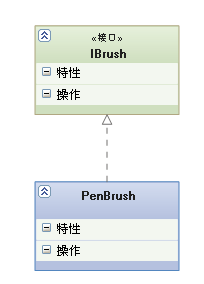
实现(Realization)

【实现关系】:是一种类与接口的关系,表示类是接口所有特征和行为的实现.

【箭头指向】:带三角箭头的虚线,箭头指向接口

泛化

关联(Association)

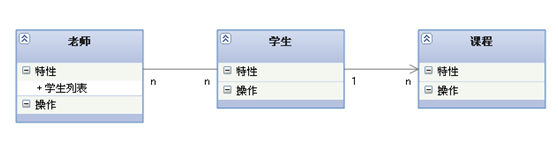
【关联关系】:是一种拥有的关系,它使一个类知道另一个类的属性和方法;如:老师与学生,丈夫与妻子关联可以是双向的,也可以是单向的。双向的关联可以有两个箭头或者没有箭头,单向的关联有一个箭头。

【代码体现】:成员变量

【箭头及指向】:带普通箭头的实心线,指向被拥有者

关联

上图中,老师与学生是双向关联,老师有多名学生,学生也可能有多名老师。但学生与某课程间的关系为单向关联,一名学生可能要上多门课程,课程是个抽象的东西他不拥有学生。

聚合(Aggregation)

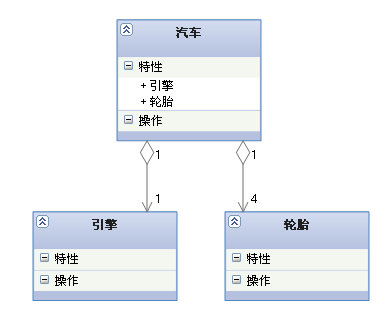
【聚合关系】:是整体与部分的关系,且部分可以离开整体而单独存在。如车和轮胎是整体和部分的关系,轮胎离开车仍然可以存在。

聚合关系是关联关系的一种,是强的关联关系;关联和聚合在语法上无法区分,必须考察具体的逻辑关系。

【代码体现】:成员变量

【箭头及指向】:带空心菱形的实心线,菱形指向整体

聚合

组合(Composition)

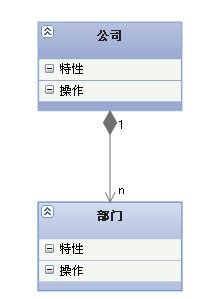
【组合关系】:是整体与部分的关系,但部分不能离开整体而单独存在。如公司和部门是整体和部分的关系,没有公司就不存在部门。

组合关系是关联关系的一种,是比聚合关系还要强的关系,它要求普通的聚合关系中代表整体的对象负责代表部分的对象的生命周期。

【代码体现】:成员变量

【箭头及指向】:带实心菱形的实线,菱形指向整体

泛化

依赖(Dependency)

【依赖关系】:是一种使用的关系,即一个类的实现需要另一个类的协助,所以要尽量不使用双向的互相依赖.

【代码表现】:局部变量、方法的参数或者对静态方法的调用

【箭头及指向】:带箭头的虚线,指向被使用者

泛化

各种关系的强弱顺序

泛化 = 实现 > 组合 > 聚合 > 关联 > 依赖

评论和共享

Redux 中使用 Object Spread Operator (…)

ES7 Stage 3 阶段

不直接修改 stateRedux 的核心理念之一, 所以你会发现自己总是在使用 Object.assign() 创建对象拷贝, 而拷贝中会包含新创建或更新过的属性值。在下面的 todoApp 示例中, Object.assign() 将会返回一个新的 state 对象, 而其中的 visibilityFilter 属性被更新了:

1
2
3
4
5
6
7
8
9
10
function todoApp(state = initialState, action) {
switch (action.type) {
case SET_VISIBILITY_FILTER:
return Object.assign({}, state, {
visibilityFilter: action.filter
})
default:
return state
}
}

尽管这样可行, 但 Object.assign() 冗长的写法会迅速降低 reducer 的可读性。

一个可行的替代方案是使用ES7的对象展开语法提案。该提案让你可以通过展开运算符 (...) , 以更加简洁的形式将一个对象的可枚举属性拷贝至另一个对象。对象展开运算符在概念上与ES6数组展开运算符相似

1
2
3
4
5
6
7
8
function todoApp(state = initialState, action) {
switch (action.type) {
case SET_VISIBILITY_FILTER:
return { ...state, visibilityFilter: action.filter }
default:
return state
}
}

目前对象展开运算符提案还处于 ES7 Stage 2 草案阶段, 若你想在产品中使用它得依靠转换编译器, 如 Babel。 你可以使用 es2015 预设值, 安装 babel-plugin-transform-object-rest-spread 并将其单独添加到位于 .babelrcplugins 数组中。

1
2
3
4
{
"presets": ["es2015"],
"plugins": ["transform-object-rest-spread"]
}

评论和共享

作者的图片

Archie Shi

Nothing to say


Front-End Development Engineer